Learn C#.NET, ASP.NET MVC 5,ASP.NET Core that you can increase your knowledge and coding to develop the real-time project.


Showing posts with label interface in c# with example. Show all posts

Sunday, April 15, 2018

[C#]: Explicit Interface and Implicit Interface In C# With Example [Step by Step]

In this post, we will learn the types of Interface in C#.NET with an example in a simple way.
We have already discussed the basic concept of the interface in part one of this series. If you want to learn please click on the link basic interface concept.
Interface In C# With Example

Type of interface in C#
  • Explicit Interface
  • Implicit Interface 
  1. Explicit Interface:
    If the class implement two interfaces that contain a member with the same signature.to implementing those interface member in class we take help of explicit interface.
How to implement the explicit interface?
  1. return_Type Interface_Name.Method_Name()  
  2.         {  
  3.             //...  
  4.         }  

Note: The modifier is not valid to implement an explicit interface. 

Example 1:
Create two interfaces having only one method with the same signature as follow. 
  1. interface IVendor  
  2.    {  
  3.        void GetVendor();  
  4.    }  
  5.    interface ISupplier  
  6.    {  
  7.        void GetVendor();  
  8.    }  

Create one class name like 'UserService' to implementing those interfaces. 
  1. public class UserService:IVendor,ISupplier  
  2.    {  
  3.           
  4.         void IVendor.GetVendor()  
  5.        {  
  6.            Console.WriteLine("GetVendor() method called from IVendor interface");  
  7.        }  
  8.         void ISupplier.GetVendor()  
  9.        {  
  10.            Console.WriteLine("GetVendor() method called from ISupplier interface");  
  11.        }  
  12.    }  

 If you try to implement the interface member without 'interface name', then it will through an error as follows.
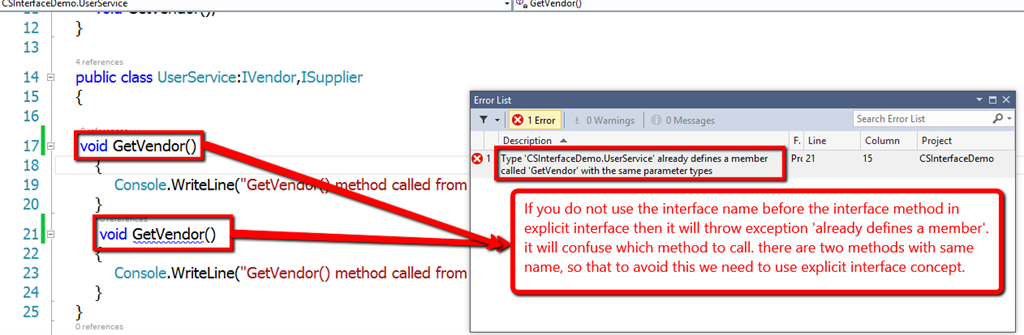
 Interface In C# With Example

How to call the interface member?

    In the explicit interface, we can not call the interface member directly using the object of the class. we have two way of calling explicit interface as following.

There is two way of calling an explicit interface member: 
  1. The first way to creating the instance of the class and typecast the interface type.
  2. Second Way creating an object of the class and reference variable of the interface type.
  1. class Program  
  2.    {  
  3.        static void Main(string[] args)  
  4.        {  
  5.            // The first way to creating the instance of the class and typecast the interface type.   
  6.            UserService userService = new UserService();  
  7.            ((IVendor)userService).GetVendor();  
  8.            ((ISupplier)userService).GetVendor();  
  9.   
  10.            // Second Way creating an object of the class and reference variable of the interface type.  
  11.   
  12.            IVendor vendor = new UserService();  
  13.            vendor.GetVendor();  
  14.            ISupplier supplier = new UserService();  
  15.            supplier.GetVendor();  
  16.   
  17.            Console.ReadLine();  
  18.        }  
  19.    } 

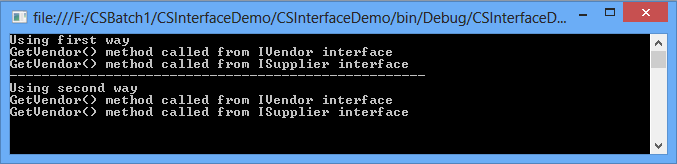
 Output: 
 Interface In C# With Example

You can use either one of the ways of calling an explicit interface member as per the requirement.
Example 2:

  1. using System;  
  2.   
  3. namespace CSInterfaceDemo.Customer  
  4. {  
  5.     interface IService1  
  6.     {  
  7.         void Print();  
  8.     }  
  9.     interface IService2  
  10.     {  
  11.         void Print();  
  12.     }  
  13.     public class Customer:IService1, IService2  
  14.     {  
  15.         void IService1.Print()  
  16.         {  
  17.             Console.WriteLine("IService1.Print()");  
  18.         }  
  19.         void IService2.Print()  
  20.         {  
  21.             Console.WriteLine("IService2.Print()");  
  22.         }  
  23.     }  
  24.   
  25.     class program  
  26.     {  
  27.         static void Main(string[] args)  
  28.         {  
  29.             // The first way to creating the instance of the class and typecast the interface type.     
  30.             Customer customer = new Customer();  
  31.             ((IService1)customer).Print();  
  32.             ((IService2)customer).Print();  
  33.   
  34.             // Second Way creating an object of the class and reference variable of the interface type.   
  35.             IService1 service1 = new Customer();  
  36.             service1.Print();  
  37.             IService2 service2 = new Customer();  
  38.             service2.Print();  
  39.   
  40.             Console.ReadLine();  
  41.         }  
  42.     }  
  43. }  

    
2. Implicit Interface: The implicit interface does not have the same signature of the interface member. We can call the implicit interface member by using the object of the class.

Note: The modifier is required to implement the implicit interface.

 How to implement the implicit interface?

  1. modifier return_type interface_method_name()  
  2.         {  
  3.             //....
  4.         }  

The following is an example of the implicit interface.

 Example 1:
  1. using System;  
  2.   
  3. namespace CSInterfaceDemo.Customer  
  4. {  
  5.     interface IService1  
  6.     {  
  7.         void Print();  
  8.     }  
  9.     interface IService2  
  10.     {  
  11.         void Display();  
  12.     }  
  13.     public class Customer:IService1, IService2  
  14.     {  
  15.        public void Print()  
  16.         {  
  17.             Console.WriteLine("IService1.Print()");  
  18.         }  
  19.        public void Display()  
  20.         {  
  21.             Console.WriteLine("IService2.Display()");  
  22.         }  
  23.     }  
  24.   
  25.     class program  
  26.     {  
  27.         static void Main(string[] args)  
  28.         {  
  29.             Customer customer = new Customer();  
  30.             customer.Print();  
  31.             customer.Display();  
  32.   
  33.             Console.ReadLine();  
  34.         }  
  35.     }  
  36. }  

 Note :
The best practice to work with the interface by adding new code. You can achieve a new requirement by adding new separate interface instead of changing the old source code. The same advice from the Interface Segregation Principle (ISP),
“Clients should not be forced to depend on methods that they do not use.” by Robert C. Martin.

 I hope you understood the basic concept of explicit and implicit interface.

More information watch video as follows:

Share:

Friday, April 13, 2018

[C#]: Why should we use Interface in c#

In this post, we will discuss Interface in C# and Why should we use Interface in c#. Learn about the interface in c# with real time example. I hope this will be very helpful for developing real-time projects for freshers as well as experienced people.

Why should we use Interface in c#

What is the need for Interface in c#? Why use Interface?

  • It is used to Decouple the application.
  • It is very useful for Dependency Injection.
  • It is useful for Test isolation and Mocking.
  • It is used for Extensibility

What is Interface in C#?

  • An interface can contain only the declaration of properties, methods, events, indexers etc.
  • Interface member does not have the definition.
  • Interface member is by default Public. We can not provide access modifier to the interface member.
  • We can inherit more than one interface in a class. Once we inherit interface in a class, we must provide a definition to the interface member.
  • An interface cannot contain fields, operators, instance constructor, etc.
In order to work with the interface, we use the "Interface" keyword to create an interface. We can provide "I" as an interface naming prefix for interface names like IVendor, ICustomer etc.

Syntax:
  1. interface interface_name  
  2.    {   
  3.        // interface member declaration  
  4.    }  


Note: 
We can not provide access modifiers, static, sealed and abstract keywords to the interface member.

Example

Create an interface which has a name like IVendor as follows.
  1. interface IVendor  
  2.    {  
  3.        bool AllowAccessToUser { getset; }  
  4.        string GetVendorName(int vendorId);  
  5.    }  

Now, we need to create a class to implement interface member. Create a class which has a name like Vendor as follows. 
  1. public class Vendor: IVendor  
  2.    {  
  3.        public bool AllowAccessToUser { getset; }  
  4.        public string GetVendorName(int vendorId)  
  5.        {   
  6.            string vendorName =string.Empty;  
  7.            switch (vendorId)  
  8.            {   
  9.                case 1:  
  10.                    vendorName = "TATA";  
  11.                    AllowAccessToUser = true;  
  12.                    break;  
  13.                case 2:  
  14.                    vendorName = "TCS";  
  15.                    AllowAccessToUser = true;  
  16.                    break;  
  17.                default:  
  18.                    vendorName = "NULL";  
  19.                    AllowAccessToUser = false;  
  20.                    break;  
  21.            }  
  22.            return vendorName;                  
  23.        }  
  24.    }  

We can call the vendor class member by creating an instance of vendor class from the main method. Define the main method to access the vendor detail. There is one method, "GetVendorName()", based on vendorId as shown in the above example. In the same way, we have created one property for user permission. Based on the vendor we can provide the access to the user. 

  1. class Program  
  2.     {         
  3.         static void Main(string[] args)  
  4.         {  
  5.             Vendor vendor = new Vendor();             
  6.             Console.WriteLine("Vendor name is {0}, Allow access to user is {1}", vendor.GetVendorName(1),vendor.AllowAccessToUser);  
  7.             Console.WriteLine("Vendor name is {0}, Allow access to user is {1}", vendor.GetVendorName(4), vendor.AllowAccessToUser);  
  8.             Console.ReadLine();  
  9.         }  
  10.     }  

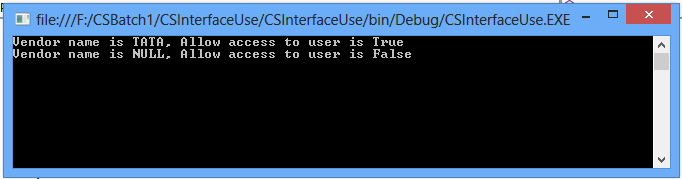
Output
Why should we use Interface in c#

How to implement more than one interface in a class.


Create two interface names as "IVendor" and "IUserPermission". Copy the above example and paste it into a separate class. Create one more interface "IUserPermission" interface having one property and remove the property used in IVendor interface. Paste into the newly-created interface; i.e., "IUserPermission". There are no major changes.
This is the example to understand how to implement more than one interface in a class.
  1. interface IVendor  
  2.    {         
  3.        string GetVendorName(int vendorId);  
  4.    }  
  5.    interface IUserPermission  
  6.    {  
  7.        bool AllowAccessToUser { getset; }  
  8.    }  
  9.    public class Vendor : IVendor, IUserPermission  
  10.    {  
  11.        public bool AllowAccessToUser { getset; }  
  12.        public string GetVendorName(int vendorId)  
  13.        {   
  14.            string vendorName =string.Empty;  
  15.            switch (vendorId)  
  16.            {   
  17.                case 1:  
  18.                    vendorName = "TATA";  
  19.                    AllowAccessToUser = true;  
  20.                    break;  
  21.                case 2:  
  22.                    vendorName = "TCS";  
  23.                    AllowAccessToUser = true;  
  24.                    break;  
  25.                default:  
  26.                    vendorName = "NULL";  
  27.                    AllowAccessToUser = false;  
  28.                    break;  
  29.            }  
  30.            return vendorName;                  
  31.        }  
  32.    }  
  33.    class Program  
  34.    {         
  35.        static void Main(string[] args)  
  36.        {  
  37.            Vendor vendor = new Vendor();             
  38.            Console.WriteLine("Vendor name is {0}, Allow access to user is {1}", vendor.GetVendorName(1),vendor.AllowAccessToUser);  
  39.            Console.WriteLine("Vendor name is {0}, Allow access to user is {1}", vendor.GetVendorName(4), vendor.AllowAccessToUser);  
  40.            Console.ReadLine();  
  41.        }  
  42.    }  

We will discuss the type of interface and real-time use of the interface in part two of this series.

I hope you understood the basic concept of interface.

More information please watch the video as follows:

Share:

Upcoming Articles/Videos

Design Pattern
SOLID Design Principles
Copyright © Programming With Shri | Powered by Shrimant Telgave Home | Disclaimer | Privacy Policy | Terms and Conditions Design by Shrimant Telgave